Photoreal · Capture
Real Tin Can
F4 on the minor comb. Its drum rings at 359.4 Hz.
A tin can is a steel can with a thin coat of tin that keeps it from rusting.
- Shelf
- Photoreal
- Kind
- Capture
- Sound
- Yes
- Licenses
- CC0, MIT, BSD
Its note
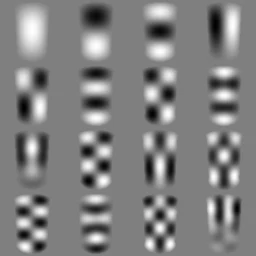
Splashery stretches a drumhead over this Splash's outline, twelve inches across, and finds the ways it can ring. Its lowest is 359.4 Hz, 50 cents sharp of F4. The next fifteen are its overtones, and each one draws its own figure: sand gathers on the lines that stay still.
- 1359 Hz
- 2473 Hz
- 3615 Hz
- 4647 Hz
- 5725 Hz
- 6771 Hz
- 7830 Hz
- 8932 Hz
- 9942 Hz
- 10957 Hz
- 111010 Hz
- 121089 Hz
- 131097 Hz
- 141098 Hz
- 151192 Hz
- 161232 Hz
How to play
Tap it to knock it into a spin. Pick its label under Look in the Splash tab.
About it
A tin can is a steel can with a thin coat of tin that keeps it from rusting. Food is sealed inside and heated to kill germs, so it stays good for years. Cans were invented in the early 1800s, but a handy can opener came only about 50 years later; before that, people used a hammer and chisel.
Tap it to knock it onto its bottom rim: it spins around on the rim faster and faster, like a coin settling, and drops flat with a clank. Under Look in the Splash tab, pick a peaches label, a tomatoes label, plain metal or the original scan.
Sources and credits
| Work | By | License |
|---|---|---|
| Can opened with side openerMade into 3D Gaussian splats from this one photo with the TRELLIS image-to-3D model (MIT), recentered and scaled. The peaches and tomatoes labels are original designs made for Splashery (CC0), wrapped around the can's side over the scan's own shading; plain metal and the bare scan are in Look. | Ll1324 | CC0 1.0 |
| Rolling Can Sound 2 (tin-can-real-roll.mp3) | cower | CC0 1.0 |
Libraries
- MIT, BSD
- WebP codec (splat-transform, with libwebp)